
How to make Windows 10 USB bootable from ISO?
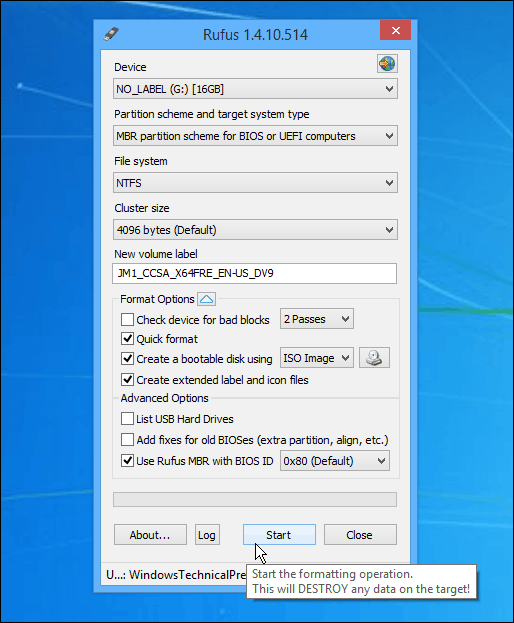
How to create Windows 10 installation USB from ISO
Set the following options in Rufus to make a bootable USB flash device.From the Device drop-down option, select the USB flash drive.Click SELECT to choose the downloaded ISO file.Keep other options to default values. Then, click START to create a Windows bootable USB from ISO.
How to put Windows 10 ISO on USB with Rufus
Create bootable USB drive of Windows 10 from ISOOpen Rufus' website.Under the “Download” section, click the link to download the latest version of the tool.Double-click the executable to launch Rufus.Under the “Device” section, use the drop-down menu, and select the USB flash drive to create the bootable media.
How to make a bootable USB Windows
To create a bootable USB flash driveInsert a USB flash drive into a running computer.Open a Command Prompt window as an administrator.Type diskpart .In the new command line window that opens, to determine the USB flash drive number or drive letter, at the command prompt, type list disk , and then click ENTER.
How do I Create a bootable disk for Windows 10
How to create a Windows 10 installation diskRequirements.Method 1: Use the Media Creation Tool.Method 2: Download ISO and create bootable USB. Download ISO (Windows). Download ISO (macOS, Linux). Create bootable USB with Rufus.How to boot with your installation disk.
How do I make a bootable USB from an ISO file
How to boot ISO using USB driveDownload any third-party tool like Rufus, UltraISO, YUMI.Add the ISO image file into the tool.Insert the USB Drive to burn the ISO file.Once the ISO boot files are copied to the USB drive, you can insert them into the target computers for booting from ISO file.
Can you install Windows from an ISO on a USB
Use File Explorer to copy and paste the entire contents of the Windows product DVD or ISO to the USB flash drive. Optional: add an unattend file to automate the installation process. For more information, see Automate Windows Setup.
How do I manually create a bootable USB from ISO
How to boot ISO using USB driveDownload any third-party tool like Rufus, UltraISO, YUMI.Add the ISO image file into the tool.Insert the USB Drive to burn the ISO file.Once the ISO boot files are copied to the USB drive, you can insert them into the target computers for booting from ISO file.
Can ISO be bootable USB
An ISO file combines all the Windows installation files into a single uncompressed file. If you choose to download an ISO file so you can create a bootable file from a DVD or USB drive, copy the Windows ISO file onto your drive and then run the Windows USB/DVD Download Tool.
How do I create a bootable USB from an ISO manually
How to boot ISO using USB driveDownload any third-party tool like Rufus, UltraISO, YUMI.Add the ISO image file into the tool.Insert the USB Drive to burn the ISO file.Once the ISO boot files are copied to the USB drive, you can insert them into the target computers for booting from ISO file.
How to easily create Windows 10 bootable USB
To create a Windows 10 bootable USB, download the Media Creation Tool. Then run the tool and select Create installation for another PC. Finally, select USB flash drive and wait for the installer to finish. Connect a USB to your Windows 10 PC.
How to make bootable USB from ISO
How to boot ISO using USB driveDownload any third-party tool like Rufus, UltraISO, YUMI.Add the ISO image file into the tool.Insert the USB Drive to burn the ISO file.Once the ISO boot files are copied to the USB drive, you can insert them into the target computers for booting from ISO file.
Can I burn an ISO to a USB flash drive
Can I convert a Windows 10 ISO to USB Yes, you can! To make a copy of Windows 10 on a USB flash drive, download and launch the Windows Media Creation tool, select Create installation media and follow the prompts. Then download and install Rufus to complete the process.
How to convert ISO file to bootable USB using Rufus
How to Create Bootable USB Drive Using RufusStep1: Download an ISO file. The first step is to download the ISO file.Step2: Insert USB. ADVERTISEMENT.Step3: Run Rufus. Now, run Rufus executable file.Step3: Select the ISO file.Step4: Create Bootable.
Can I just copy ISO for bootable USB
To do this, go to the 'My Computer' window, right-click on the DVD drive where you put the ISO image, select Open to view the contents. Copy all the files and folders on the DVD to the USB drive. Congratulations, you've succeeded in creating a bootable USB without any software!
Can I mount ISO to USB
ISO is a file format that is always used on CD, DVD or Blu-ray Disc. It helps to archive operating system. Different users choose to burn ISO image file to a USB flash drive for different reasons: ►Get a tiny bootable Windows USB drive and carry it to any place and boot any computer.
Can I extract ISO to USB
Be sure to check your USB folder to confirm that you have enough storage space for the content you want to copy. Open your DVD folder and select your ISO file. Right-click and select “copy” from your pop-up options menu. Move back to your USB folder and paste your copied files.
How do I manually Create a bootable USB from ISO
How to boot ISO using USB driveDownload any third-party tool like Rufus, UltraISO, YUMI.Add the ISO image file into the tool.Insert the USB Drive to burn the ISO file.Once the ISO boot files are copied to the USB drive, you can insert them into the target computers for booting from ISO file.
How to create Windows 10 bootable USB without Bootcamp
Step one and i'm going to show you how to do all. This step one is to download the windows. 10 iso file step two you're going to insert your usb. Drive into the mac.
How to copy ISO file to USB and make it bootable using CMD
USB Harddriveinsert the USB key.Open CMD – as an Admin.DISKPART.LIST DISK – Will display the disks available.SELECT DISK * – Will select the disk ** Ensure you select the right disk **CLEAN.CREATE PARTITION PRIMARY.SELECT PARTITION * – The Nº of the partition that you want to be primary.
How do I burn an ISO to a USB and make it bootable
#3. Burn ISO to USBLaunch EaseUS Partition Master and go to the Bootable Media section. Click "Burn ISO" and click "Next".Select the ISO image that you have downloaded on your PC, and click "Open".Click "Next" and select the target USB as destination and click "Burn" to execute the operation.
How to create Windows USB boot disk from ISO
Move 2: Create Bootable USB from ISO
Just go to the Tools page, click Media Builder, choose your USB flash disk and create USB boot disk from ISO. After that, you can boot the PC that needs to install an OS from the bootable USB flash drive and then start system recovery.
Can you boot from ISO on USB
If you choose to download an ISO file so you can create a bootable file from a DVD or USB drive, copy the Windows ISO file onto your drive and then run the Windows USB/DVD Download Tool. Then simply install Windows onto your computer directly from your USB or DVD drive.
How to create Windows USB from ISO Rufus
To create a Windows 11 bootable USB using Rufus:Download the Windows 11 ISO file from the Microsoft website.Download and run Rufus, no installation required.Connect a USB flash drive to your computer with at least 8GB of storage capacity.Open Rufus and select the connected USB drive from the "Device" dropdown menu.
Can Rufus make Windows USB
Rufus is a utility that helps format and create bootable USB flash drives, such as USB keys/pendrives, memory sticks, etc. It can be especially useful for cases where: you need to create USB installation media from bootable ISOs (Windows, Linux, UEFI, etc.)
How to make Windows bootable USB with Rufus
To create a Windows 11 bootable USB using Rufus:Download the Windows 11 ISO file from the Microsoft website.Download and run Rufus, no installation required.Connect a USB flash drive to your computer with at least 8GB of storage capacity.Open Rufus and select the connected USB drive from the "Device" dropdown menu.


0 Comments