
Is it OK to clone HDD to SSD?
Is it safe to clone a hard drive to SSD
In general, cloning an HDD to SSD is not bad. And you can benefit a lot from it. If your SSD has files stored on it, you'd better back it up in advance because cloning HDD to SSD will wipe the data stored on the target device.
Can you replace HDD with SSD without cloning
Still, if you wish not to go for cloning, you must install a new copy of Windows in your new SSD drive. You can copy-paste the rest of the data from the old HDD to SSD, but you can not copy your OS. Therefore, a fresh copy of the Windows installation is required.
How do I clone my hard drive to SSD Windows 10
Here's how it works.BOOT UP THIRD-PARTY SOFTWARE OR THE SYSTEM IMAGE TOOL. Windows 10 comes with a built-in tool called System Image to help transfer your hard drive.START THE CLONING PROCESS.FINISH THE CLONING PROCESS.CONNECT NEW HARD DRIVE.MAKE YOUR NEW HARD DRIVE BOOTABLE.
How do I clone my hard drive to SSD Windows 10 for free
#2. Clone Windows to SSD for FreeSelect "Clone" from the left menu. Click "Clone Partition" and "Next".Select the source partition and click "Next".Choose your the target partition and click "Next "to continue.Click Start and wait for the clone to complete.
Can cloning damage hard drive
Cloning a hard drive can avoid the process of time-consuming reinstall the system and reconfigure settings. And cloning is very safe, it plays a significant role in managing and protecting data. The best way to clone a hard drive to SSD is to seek the help of third-party software.
Does cloning SSD erase data
Cloning a hard drive will not delete everything on the source drive, but it does erase everything on the target drive. If you want to clone your HDD to SSD, everything on the HDD will not be changed, but SSD data will be deleted.
Should I clone HDD to SSD or clean install
After reading this article, do you know whether to choose SSD clone or clean install In summary, if your Windows operating system performs well, you can choose SSD clone to save your time and effort. Otherwise, if your old disk has problems that affect normal operation, you should choose a clean install.
How do I clone a 1TB hard drive to SSD
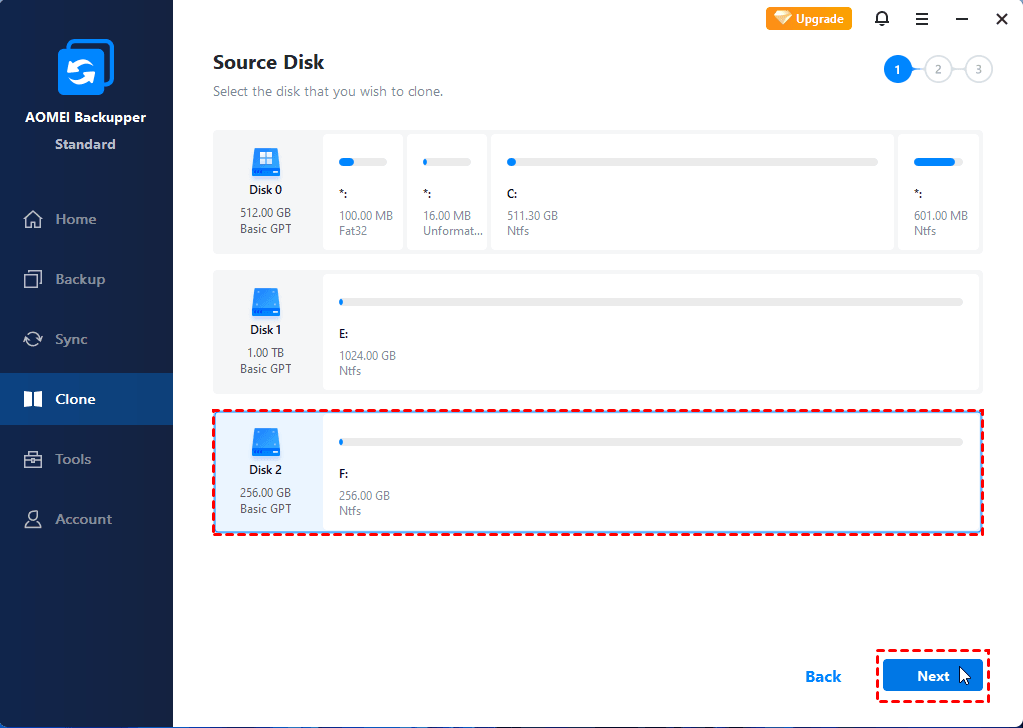
How Do I Clone A 1TB Hard Drive to A 2TB SSDSelect the source disk. Go to the "Clone" tab, click "Clone OS Disk" or "Click Data Disk". And then click "Next" to continue.Select clone mode. You can select "Autofit the disk", "Clone as the source" to customize your disk layout.Click "Start" to start cloning process.
Can you move just Windows from HDD to SSD
To transfer Windows 10 from HDD to SSD, you can rely on the best cloning software – AOMEI Backupper. It offers you two ways to transfer Windows from one hard drive to another: clone entire hard drive with "Disk Clone" feature or clone only OS with "System Clone" feature.
Does cloning a drive make it bootable
Cloning a hard drive means creating the exact copy of the original drive, including the system, applications, and settings. It becomes bootable if you clone the system hard drive of your computer to another hard drive, and you can use it to replace the original drive.
How do I clone my hard drive to SSD without losing data
So today I'm going to teach you guys how to do that without losing any of your data. So the first step is to buy an SSD then a cable that looks like this it should have a SATA power connector on one
What are 3 disadvantages of cloning
Disadvantages of CloningNot reliable.Eliminates genetic diversity.High level of uncertainty.Not at all a safe process.Cloning is unethical.It can easily be misused.It may promote discrimination.
Why is cloning so bad
Researchers have observed some adverse health effects in sheep and other mammals that have been cloned. These include an increase in birth size and a variety of defects in vital organs, such as the liver, brain and heart. Other consequences include premature aging and problems with the immune system.
Is copying from HDD to SSD faster
On a typical HDD, copying a large file, such as a movie or graphic design project, happens at a relatively pedestrian rate of 15 to 30 MB/s. A SATA SSD can copy the same file at 500 MB/s, while a newer NVMe SSD will reach speeds of 3,500 MB/s — that's 3.5 GB per second.
Can I clone a 1TB HDD to a 256GB SSD
You can clone a larger hard disk to a smaller SSD, but only if the SSD is big enough to hold the HDD's whole data. For instance, disk cloning is impossible if the total quantity of data on the HDD is greater than 256GB. Cloning a larger HDD to a smaller SSD will benefit you in many aspects: Reduced boot time.
Can I clone a 1TB HDD to a 500GB SSD
Answer: It is possible to clone 1TB HDD to 500GB SSD
In fact, the answerer is positive, as long as the used capacity on the source HDD is not larger than the capacity of the destination SSD. At this point, what you need is proper HDD to SSD cloning software.
Can I move just my OS to an SSD
You can use a cloning tool to copy your OS from HDD to SSD. You can create a system image of your PC and later restore it to your SSD. Also, you can download an ISO of your Windows and install it fresh on your new drive.
Can I install Windows on SSD without removing HDD
You can perform a clean installation of Windows 10 on an SSD without removing the old HDD. But it is highly recommended that you should make a system image of the Windows 10 computer in case something goes wrong during the clean installation process.
Is cloning better than fresh install
Compared with fresh install, cloning is much more convenient, not only easy to operate, but also without data loss. As a result, cloning is a better option if your current operating system and other software are in good working condition.
Does cloning an SSD make it slower
Usually, users choose to clone Windows 10 from HDD to SSD to boost Windows 10 running speed. However, according to some user feedback, Windows 10 is slow after cloning to SSD. In fact, the most common cause of this problem is that the SSD is not in optimal condition because it is misconfigured.
Why is cloning not okay
The predominate theme underlying arguments against human cloning is that the cloned child would undergo some sort of physical, social, mental, or emotional harm. Because of these and other concerns, the United Nations and many countries have banned human cloning.
Why cloning must be banned
Most scientific experts believe that attempts to clone humans will result in even higher failure rates. Scientists such as Ian Wilmut (who produced Dolly) and Rudolf Jaenisch (of MIT) have concluded that the most likely cause of abnormal development in cloned animals is faulty reprogramming of the genome.
Is 500mb s SSD good
Typically, you'll want at least 500 MB/s to read speed, but if you're playing high-end AAA games, you should look for a drive with read speeds of up to 550 MB/s or better. At least 500 MB/s is recommended for write speeds, but if you're playing more advanced or demanding games, you'll want 550 MB/s or more.
How long does it take to clone a 1tb drive to SSD
It is a common question how long it takes to copy a hard disk to an SSD. It depends on how much data you need to move, how quickly the cloning program runs, the read and write speeds, the computer system, the hard disk, etc. Therefore, the usual wait time would be between 10 mins and 1 hour.
Can I clone a 1TB HDD to a 2TB SSD
The answer is YES. Using a disk cloning program, you can clone a 1TB HDD to a 2TB SSD with ease. The process involves the following main steps. EaseUS Disk Copy is a popular Windows 11/10/8/7 disk and partition cloning tool that will ensure a smooth HDD to SSD cloning without reinstalling the operating system.


0 Comments