
Is there a free tool to clone OS to SSD?
How to copy OS from HDD to SSD free
#2. Clone Windows to SSD for FreeSelect "Clone" from the left menu. Click "Clone Partition" and "Next".Select the source partition and click "Next".Choose your the target partition and click "Next "to continue.Click Start and wait for the clone to complete.
Can I clone my OS to SSD
You can use a cloning tool to copy your OS from HDD to SSD. You can create a system image of your PC and later restore it to your SSD. Also, you can download an ISO of your Windows and install it fresh on your new drive.
How to clone HDD to SSD bootable
1. Clone Hard Drive to SSDSelect the source disk. Go to the "Clone" tab, click "Clone OS Disk" or "Click Data Disk". And then click "Next" to continue.Select clone mode. You can select "Autofit the disk", "Clone as the source" to customize your disk layout.Click "Start" to start cloning process.
How to clone SSD on Windows 10
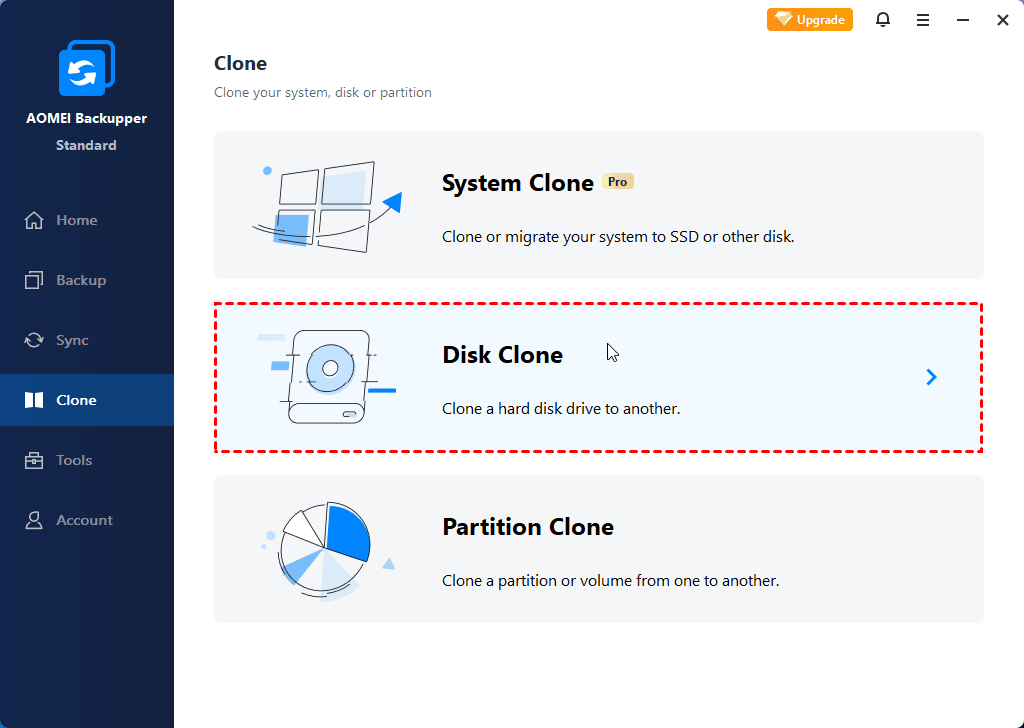
◆ Graphic TutorialDownload and install the disk cloning software and connect the new SSD.Start it and go to Clone -> Disk Clone option.Select the hard drive as the source disk.Choose the larger or smaller SSD as the destination disk.Tick SSD Alignment to accelerate the reading and writing speed of the SSD disk.
What is the best software to migrate OS to SSD free
The Best SSD Migration Software1) EaseUS Disk Copy.2) Acronis Disk Director 12.3) AOMEI Backupper Professional.4) MiniTool ShadowMaker Pro.5) O&O SSD Migration Kit 7.6) Paragon Hard Disk Manager.7) DiskGenius.8) Macrium Reflect 8 Home.
How can I migrate my OS for free
2. Migrate OS with free OS migration softwareMigrate OS with free OS migration software.Download and install AOMEI Partition Assistant Standard.Choose a clone method in this window.Choose the old hard drive as the source drive in this step and click "Next".And choose a new hard drive as the destination drive.
Can I clone just the operating system
Can you clone an OS You can clone the Windows operating system with a capable disk partition cloning software, like EaseUS Disk Copy. This drive cloning tool allows you to migrate your operating system and applications to another hard drive without fresh installing again.
How do I clone a boot drive
To change the boot priority on your system:Restart your PC.Press the F2 key upon startup to enter BIOS.Once the BIOS loads, navigate to the boot option and select the new hard drive as the first boot device.Press the F10 key to save changes.Exit.
Does cloning a drive make it bootable
Cloning a hard drive means creating the exact copy of the original drive, including the system, applications, and settings. It becomes bootable if you clone the system hard drive of your computer to another hard drive, and you can use it to replace the original drive.
How do I clone my hard drive to SSD Windows 11 for free
1 – Clone Entire Hard Drive in Windows 11Select the source disk. Click the "Clone" from the left menu.Select the target disk. Choose the wanted HDD/SSD as your destination and click "Next" to continue.View the disk layout and edit the target disk partition size.Click "Start" to start the disk cloning process.
Does Windows 10 have a cloning tool
It's a pity that Windows 10 doesn't have a cloning tool. To transfer OS to another drive, you can create a system image first and then restore it to a new hard drive. However, the whole process is time-consuming and error-prone. To move OS more easily, you can try a specialized third-party cloning tool.
How to clone Windows 10 to M 2 SSD free
How to Clone SSD to M. 2 SSD/ NVMe M. 2 SSD in Windows 10Install M. 2 SSD or NVMe M.Start Windows 10 from the Source/Original SSD. In general, after you connect the M.Free Download Disk Cloning Software to Clone Hard Drive to M.Clone SSD to M.Steps to clone HDD to M.Set Your Computer Boot from Cloned M.
Is there a free OS migration tool
Yes, you can transfer the operating system for free by turning to reliable system transfer software. EaseUS Partition Master Free Edition, with its Copy Partition feature, can help you transfer the OS to a new disk for free.
Is EaseUS OS Migration free
It simplifies the process and increases the migration success rate. Later, you can also use this tool to optimize the performance of SSDs, such as 4K-aligned SSDs. If you have any needs, download EaseUS Partition Master for free and try this tool!
How to clone operating system for free
Here is a list of top free disk cloning software to clone disk:EaseUS Todo Backup.Acronis True Image (Cyber Protect Office)Clonezilla.Macrium Reflect.Paragon Drive Copy Professional.Active@ Drive Image.Iprius Backup.
Can you clone a drive without software
If you are trying to clone a hard drive without software in Windows 10, then it is not possible. Microsoft does not include any kind of tool in its operating system for making an exact copy of a hard drive in Windows. You will be able to copy all your files from one drive to another, but it will be time-consuming.
How can I clone my hard drive for free
The Best Free Disk Cloning Software1) EaseUS Partition Master Free.2) Macrium Reflect 8 Free.3) DiskGenius (Free Edition)4) MiniTool Partition Wizard Free.5) AOMEI Partition Assistant Standard.6) DriveImage XML.7) Clonezilla Live CD.
Why is Windows not booting from SSD after cloning
Causes – Why Is Cloned SSD Not Booting
The cloned SSD is not set as the boot disk. BIOS boot mode is incompatible with the SSD. The disk cloning process was corrupted or interrupted. Incomplete clones, missing boot partitions, or boot components.
Why can’t I boot from cloned drive
When your source disk is an MBR disk, the computer only supports BIOS Legacy boot mode, but if your new disk is a GPT disk, the cloned hard drive won't boot. The reason is that the GPT disk requires UEFI boot mode, but the computer doesn't support this boot mode.
How do I move Windows OS to SSD for free
2. Migrate OS with free OS migration softwareMigrate OS with free OS migration software.Download and install AOMEI Partition Assistant Standard.Choose a clone method in this window.Choose the old hard drive as the source drive in this step and click "Next".And choose a new hard drive as the destination drive.
How to clone m 2 for free
Drive then click clone this disk. Click select the disk to clone to and select your new drive now click copy partitions. And select the option shrink or extend to fill the target. Disk.
Is Microsoft migration Manager free
Migration Manager is a great free tool that you can use to migrate your data from another cloud to Office 365. Learn how to use Microsoft Migration Manager in the data migration process.
Is migrating OS same as cloning
Cloning means creating an exact copy of the existing system, and migration generally transfers data or information from one system/disk/drive to another.
How can I transfer my OS for free
2. Migrate OS with free OS migration softwareMigrate OS with free OS migration software.Download and install AOMEI Partition Assistant Standard.Choose a clone method in this window.Choose the old hard drive as the source drive in this step and click "Next".And choose a new hard drive as the destination drive.
Is EaseUS free or paid
The free version of EaseUS can recover up to 2GB of data (for Windows). If your data is less than 2GB, the free version is recommended. If you want to enjoy unlimited data recovery, you can upgrade to EaseUS Data Recovery Wizard Pro for $69.95 (monthly).


0 Comments