
How do I move my OS to SSD without cloning?
How do I transfer my OS from HDD to SSD without cloning
Without Cloning: How to Clean Install Windows 11/10/8/7 on SSDGo to Microsoft official website and select "Create Windows 11 installation Media" and download it.Check the USB flash drive because we are creating bootable media.Click on the USB from the list.Now Windows installation files will start downloading.
Can I move just my OS to an SSD
You can use a cloning tool to copy your OS from HDD to SSD. You can create a system image of your PC and later restore it to your SSD. Also, you can download an ISO of your Windows and install it fresh on your new drive.
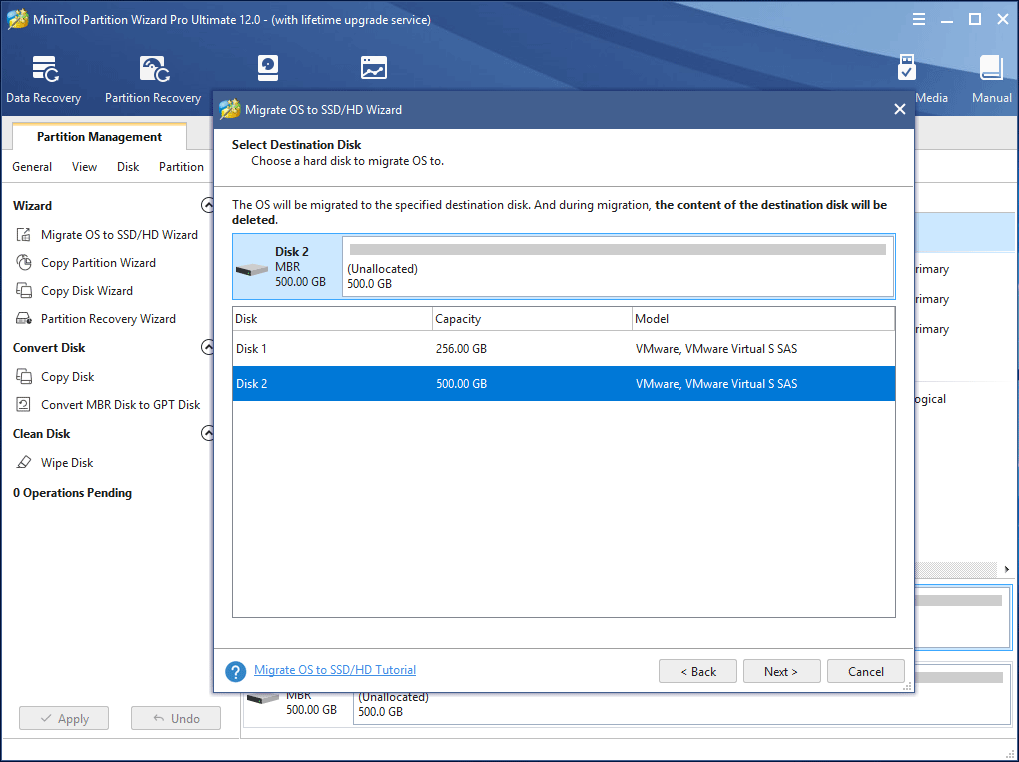
How to migrate Windows 10 to SSD without reinstalling OS
Now you have successfully migrated your OS to the new SSD. After migration it's time to boot old system using new SSD. Here's how to do that remove.
Does cloning an SSD copy the OS
Yes, cloning the hard drive will copy the OS. It will not only copy the OS; all of the source drive's contents will also be copied to the target drive. Therefore, you must be very careful while cloning since all your crucial data will be lost if you choose the source and target drives incorrectly.
Can you transfer OS from HDD to SSD without formatting
Yes, sure. You can transfer Windows from HDD to SSD with the help of reliable OS migration software such as EaseUS Partition Master.
Can I install a new SSD without reinstalling Windows
How to securely install an SSD without reinstalling WindowsConnect or install SSD to your computer properly. Generally, you just need to install the SSD alongside the old hard drive.Clone hard drive to SSD without reinstalling Windows.Boot from the cloned SSD securely.
Can I store OS in SSD
If you want to use SSD and HDD together in laptop or desktop, the best choice is to use SSD for OS and HDD for storage. Only in this way, you can fully make use of the biggest advantages of SSD and HDD disk simultaneously, make your computer run faster and store more data.
How do I install Windows on a new SSD without cloning it
Still, if you wish not to go for cloning, you must install a new copy of Windows in your new SSD drive. You can copy-paste the rest of the data from the old HDD to SSD, but you can not copy your OS. Therefore, a fresh copy of the Windows installation is required.
Is cloning of Windows to SSD bad
In general, cloning an HDD to SSD is not bad. And you can benefit a lot from it. If your SSD has files stored on it, you'd better back it up in advance because cloning HDD to SSD will wipe the data stored on the target device.
Does cloning SSD erase data
Cloning a hard drive will not delete everything on the source drive, but it does erase everything on the target drive. If you want to clone your HDD to SSD, everything on the HDD will not be changed, but SSD data will be deleted.
Can I move Windows from HDD to SSD without reinstalling
Download OS Migration Tool
Its Migrate OS to HDD/SSD feature enables all levels of Windows owners to effortlessly switch their operating systems to a new disk without OS reinstallation. This software also allows you to initialize SSD to the same system disk type as the OS drive to ensure a smooth OS transfer procedure.
Can I switch from HDD to SSD without losing data
Yes, you will lose your files on the HDD if you change from an HDD to an SSD. But if you choose to back up your HDD or clone your HDD to SSD, you can keep everything on the HDD. Changing from HDD to SSD is not like RAM; you remove one chip and insert another, then power on, but everything is OK.
Will I lose my Windows 10 license if I change my SSD
Hi Ha, swapping a HDD for an SSD is no problem, it is a minor change, that will not affect your Windows licence . .. You can reinstall Windows 10 at any time and it will not cost you anything !
Is it safe to transfer OS from HDD to SSD
Yes, sure. You can transfer Windows from HDD to SSD with the help of reliable OS migration software such as EaseUS Partition Master. For a step-by-step guide, you can refer to the tutorial guide on this page for help.
Is 1TB SSD enough for OS
So, 1TB SSD and above capacity are your common choices. If you are a gamer and want to install some games on an SSD, the capacity should be at least 500GB. But for some large games, 1TB SSD is a good choice if the budget is adequate. As for the world-famous Grand Theft Auto V, a full installation requires about 75GB.
Can I install a SSD without reinstalling Windows
How to securely install an SSD without reinstalling WindowsConnect or install SSD to your computer properly. Generally, you just need to install the SSD alongside the old hard drive.Clone hard drive to SSD without reinstalling Windows.Boot from the cloned SSD securely.
Does cloning a drive make it bootable
Cloning a hard drive means creating the exact copy of the original drive, including the system, applications, and settings. It becomes bootable if you clone the system hard drive of your computer to another hard drive, and you can use it to replace the original drive.
How long does it take to clone a 1tb drive to SSD
It is a common question how long it takes to copy a hard disk to an SSD. It depends on how much data you need to move, how quickly the cloning program runs, the read and write speeds, the computer system, the hard disk, etc. Therefore, the usual wait time would be between 10 mins and 1 hour.
Is it bad to clone an SSD
In general, cloning an HDD to SSD is not bad. And you can benefit a lot from it. If your SSD has files stored on it, you'd better back it up in advance because cloning HDD to SSD will wipe the data stored on the target device.
Can I install Windows on SSD without formatting
To answer your question, yes, you can do that. Aside from disconnecting your SSD, you can also remove all the external cables from the computer except mouse and keyboard before performing the install.
How do I transfer Windows 10 from HDD to SSD without losing data
Disk cloning.
One crucial point is that the backup process may fail if the smaller partition is still too large. Under such circumstances, cloning will be the best way to help you transfer Windows 10 from HDD to SSD without losing data.
Can I move my OS to another drive without losing data
Yes, you can, but you will need to create a backup image of your current Windows installation and then use cloning software to transfer the image to the new drive. You will then need to reinstall all your applications and settings, but the process should be fairly straightforward.
Can you move Windows to SSD without reinstalling
Download OS Migration Tool
Its Migrate OS to HDD/SSD feature enables all levels of Windows owners to effortlessly switch their operating systems to a new disk without OS reinstallation. This software also allows you to initialize SSD to the same system disk type as the OS drive to ensure a smooth OS transfer procedure.
Can I reuse my Windows 10 key on a new SSD
If Windows 10 wasn't pre-installed on your device when purchased and you used a product key to upgrade to Windows 10, then you'll need that same product key after the hardware change. Select the Start button, then select Settings > Update & Security > Activation > Change Product Key, then enter the product key.
Is it better to install OS on SSD
You should install the OS on the SSD because SSD is much better in read and write speeds. Your OS will boot faster than it was on HDD. Besides, your gaming experience will be much better, and editing videos will be quicker. Your PC can load apps almost instantly.


0 Comments