
Can I move just my OS from HDD to SSD?
Can I transfer my OS from HDD to SSD
Ideally, there are three ways to do this:You can use a cloning tool to copy your OS from HDD to SSD.You can create a system image of your PC and later restore it to your SSD.Also, you can download an ISO of your Windows and install it fresh on your new drive.
How do I transfer my OS from HDD to SSD without cloning
Without Cloning: How to Clean Install Windows 11/10/8/7 on SSDGo to Microsoft official website and select "Create Windows 11 installation Media" and download it.Check the USB flash drive because we are creating bootable media.Click on the USB from the list.Now Windows installation files will start downloading.
How do I boot to SSD instead of HDD
Here are the steps to make SSD the boot drive on Windows 11/10:Restart PC and press F2/F12/Del keys to enter BIOS.Go to the boot option, change the boot order, setting OS to boot from the new SSD.Save the changes, exit BIOS, and restart the PC. Wait patiently to let the computer boot up.
Can I transfer Windows 10 from HDD to SSD
To transfer Windows 10 from HDD to SSD, you can rely on the best cloning software – AOMEI Backupper. It offers you two ways to transfer Windows from one hard drive to another: clone entire hard drive with "Disk Clone" feature or clone only OS with "System Clone" feature.
Is migrating OS safe
Yes, it is completely safe to migrate your operating system. What you need to do is a process called cloning. Due to their quicker writing and reading speeds and quieter operation, SSDs are well-liked by users. As a result, most computer users choose to move data or OS from hard disks to SSDs.
What is the difference between clone disk and migrate OS
There is a slight difference between Cloning and migrating OS: Cloning is a bit for bit copy of one drive to another, and it would be an exact copy of the HDD with all programs files still intact. Migrate is sort of the same. However, it does not really care about the exact bits.
Can I install a new SSD without reinstalling Windows
How to securely install an SSD without reinstalling WindowsConnect or install SSD to your computer properly. Generally, you just need to install the SSD alongside the old hard drive.Clone hard drive to SSD without reinstalling Windows.Boot from the cloned SSD securely.
Does cloning an SSD copy the OS
Yes, cloning the hard drive will copy the OS. It will not only copy the OS; all of the source drive's contents will also be copied to the target drive. Therefore, you must be very careful while cloning since all your crucial data will be lost if you choose the source and target drives incorrectly.
Can I use SSD as boot
Yes, you can boot from an external SSD on a PC or Mac computer. Depending on the model, Macs in particular can be difficult to upgrade. Older iMacs or Mac Mini systems likely came with a hard disk drive — which are much slower than SSDs — or a low-capacity SSD.
Can I add SSD without removing HDD
Yes, you can put an SSD on your computer without removing the old HDD. There are two options: Some higher-end and business-class computers have additional hard drive bays. You could merely install an additional hard drive (or SSD, in your case) in the second slot if there is one.
How do I move Windows 10 to SSD without reinstalling
How do I transfer Windows 10 to my SSDRun MiniTool Partition Wizard in Windows 10.Choose Migrate OS to SSD/HD Wizard.Check option B.Select a target disk.Choose a copy option.After reading the boot note, apply all changes.
How to transfer Windows 10 from HDD to SSD without losing license
Replies (3) Disable Secure Boot.Enable Legacy Boot.If Available enable CSM.If Required enable USB Boot.Move the device with the bootable disc to the top of the boot order.Save BIOS changes, restart your System and it should boot from the Installation Media.
Is migrating OS same as cloning
Cloning means creating an exact copy of the existing system, and migration generally transfers data or information from one system/disk/drive to another.
Can I move my OS to another drive without losing data
Yes, you can, but you will need to create a backup image of your current Windows installation and then use cloning software to transfer the image to the new drive. You will then need to reinstall all your applications and settings, but the process should be fairly straightforward.
Can you clone OS only
Can you clone an OS You can clone the Windows operating system with a capable disk partition cloning software, like EaseUS Disk Copy. This drive cloning tool allows you to migrate your operating system and applications to another hard drive without fresh installing again.
Will I lose my Windows 10 license if I change my SSD
Hi Ha, swapping a HDD for an SSD is no problem, it is a minor change, that will not affect your Windows licence . .. You can reinstall Windows 10 at any time and it will not cost you anything !
Do I need to remove HDD to install SSD
Yes, you can put an SSD on your computer without removing the old HDD. There are two options: Some higher-end and business-class computers have additional hard drive bays. You could merely install an additional hard drive (or SSD, in your case) in the second slot if there is one.
Is cloning of Windows to SSD bad
In general, cloning an HDD to SSD is not bad. And you can benefit a lot from it. If your SSD has files stored on it, you'd better back it up in advance because cloning HDD to SSD will wipe the data stored on the target device.
Does SSD boot faster than HDD
SSDs are generally faster and more reliable than HDDs, but are also more expensive. If you need fast boot and load times, improved overall system performance, and can afford the higher cost per gigabyte, then an SSD is worth it.
Will Windows boot faster with SSD
To get your Windows 10 computer to boot at lightning speed, you might consider installing Windows 10 on an SSD. For a long time, SSD drives have consistently outperformed HDDs in boot performance. Typically, the normal boot time of an SSD is around 20 seconds, while an HDD is 45 seconds.
Can I replace the HDD with SSD without reinstalling Windows
How to securely install an SSD without reinstalling WindowsConnect or install SSD to your computer properly. Generally, you just need to install the SSD alongside the old hard drive.Clone hard drive to SSD without reinstalling Windows.Boot from the cloned SSD securely.
Can I install Windows on SSD without removing HDD
You can perform a clean installation of Windows 10 on an SSD without removing the old HDD. But it is highly recommended that you should make a system image of the Windows 10 computer in case something goes wrong during the clean installation process.
Can I move Windows from HDD to SSD without reinstalling
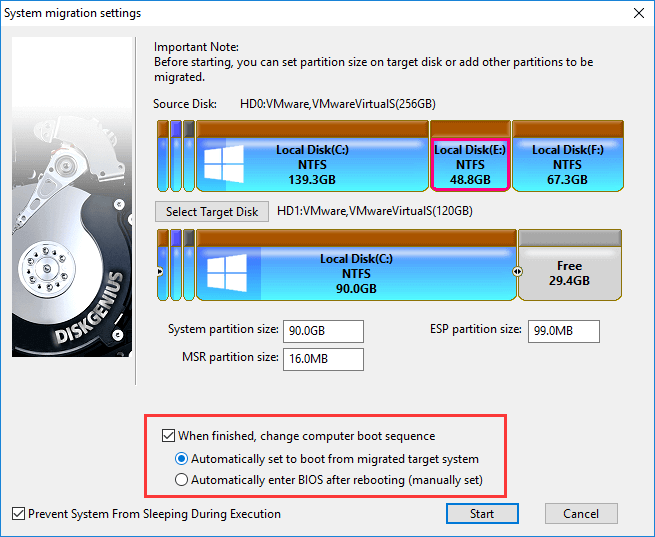
Download OS Migration Tool
Its Migrate OS to HDD/SSD feature enables all levels of Windows owners to effortlessly switch their operating systems to a new disk without OS reinstallation. This software also allows you to initialize SSD to the same system disk type as the OS drive to ensure a smooth OS transfer procedure.
Can you transfer OS from HDD to SSD without formatting
Yes, sure. You can transfer Windows from HDD to SSD with the help of reliable OS migration software such as EaseUS Partition Master.
Should I clone or migrate OS
There is a slight difference between Cloning and migrating OS: Cloning is a bit for bit copy of one drive to another, and it would be an exact copy of the HDD with all programs files still intact. Migrate is sort of the same. However, it does not really care about the exact bits.


0 Comments