
Can I clone OS only to SSD?
How do I clone just my OS to SSD
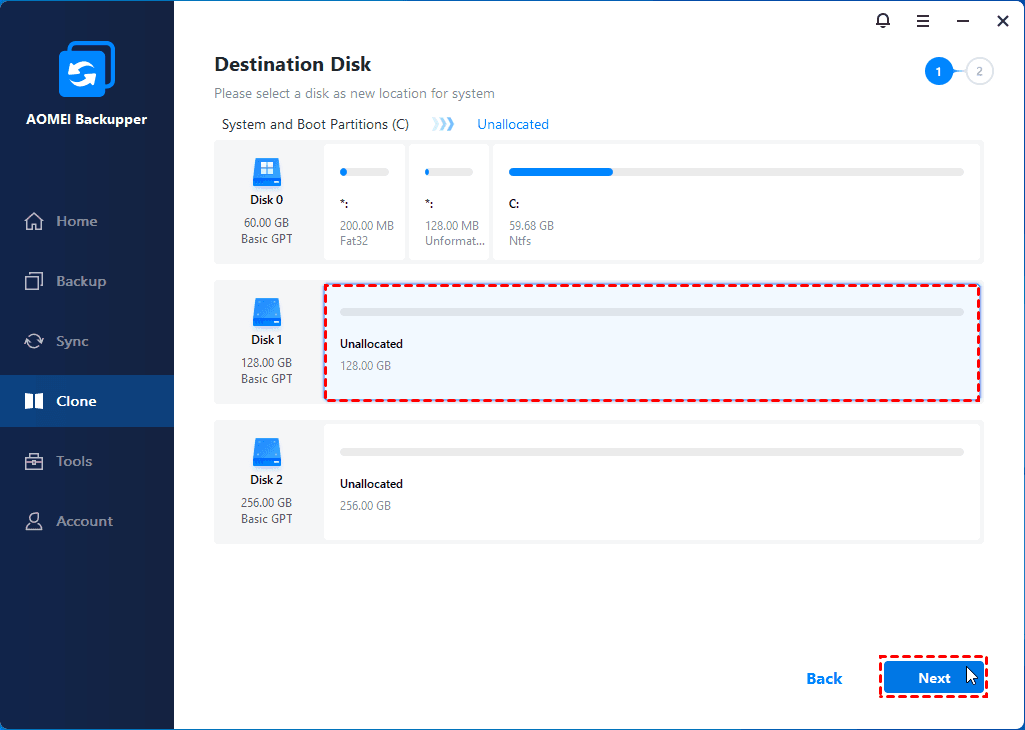
Method 1. Clone only Windows OS to SSDInstall and open AOMEI Partition Assistant Professional.Choose an unallocated space on the SSD drive.In this window, you can resize partition as you need, then click “Next”.A note on how to boot from the destination disk will appear, read it carefully and click “Finish”.
Is it safe to clone OS to SSD
Yes, it is safe to clone your HDD to an SSD. Use EaseUS Partition Master to clone your hard drive easily onto an SSD.
Can I install SSD without cloning
A system clone is the best option. It is the simplest, quickest, and most convenient way to migrate your operating system to a new SSD. It makes reinstalling data at a new location easier. You can use clean installation instead of cloning if you do not want to clone.
How to copy OS from HDD to SSD free
#2. Clone Windows to SSD for FreeSelect "Clone" from the left menu. Click "Clone Partition" and "Next".Select the source partition and click "Next".Choose your the target partition and click "Next "to continue.Click Start and wait for the clone to complete.
Can I clone OS only
Can you clone an OS You can clone the Windows operating system with a capable disk partition cloning software, like EaseUS Disk Copy. This drive cloning tool allows you to migrate your operating system and applications to another hard drive without fresh installing again.
Can you clone just Windows 10 to SSD
With the help of EaseUS Partition Master, you can easily clone OS to SSD on Windows 11/10 without reinstalling. Cloning operating system to SSD can improve your computer performance in many aspects, like faster startup process and quicker application response.
Can I clone just the operating system
Can you clone an OS You can clone the Windows operating system with a capable disk partition cloning software, like EaseUS Disk Copy. This drive cloning tool allows you to migrate your operating system and applications to another hard drive without fresh installing again.
Is cloning of Windows to SSD bad
In general, cloning an HDD to SSD is not bad. And you can benefit a lot from it. If your SSD has files stored on it, you'd better back it up in advance because cloning HDD to SSD will wipe the data stored on the target device.
How do I move my OS to SSD without reinstalling Windows
Now you have successfully migrated your OS to the new SSD. After migration it's time to boot old system using new SSD. Here's how to do that remove.
Should I initialize SSD before cloning
Before you can use your new SSD you have to initialize and partition it. If you are performing a clean installation of your operating system, or cloning to your SSD, it is not neccessary to follow these steps. A clean installation of your operating system or cloning to an SSD will initialize and partition the new SSD.
Can you transfer OS from HDD to SSD without formatting
Yes, sure. You can transfer Windows from HDD to SSD with the help of reliable OS migration software such as EaseUS Partition Master.
How long does it take to clone OS to SSD
between 10 mins and 1 hour
It is a common question how long it takes to copy a hard disk to an SSD. It depends on how much data you need to move, how quickly the cloning program runs, the read and write speeds, the computer system, the hard disk, etc. Therefore, the usual wait time would be between 10 mins and 1 hour.
Can I just clone C drive
Sure. Cloning the C drive is copying everything on the C drive to another disc partition to create a complete 1-to-1 clone of the previous hard drive.
Can you move just Windows from HDD to SSD
To transfer Windows 10 from HDD to SSD, you can rely on the best cloning software – AOMEI Backupper. It offers you two ways to transfer Windows from one hard drive to another: clone entire hard drive with "Disk Clone" feature or clone only OS with "System Clone" feature.
Can we clone only C drive
You can easily clone C drive to SSD in Windows 11/10/8/7 with the help of AOMEI Backupper and further improve the performance of SSD disk. The most highlight of this software is that it clones only used sectors by default, which make it easier to clone OS from larger HDD to smaller SSD.
Can you just clone Windows 10 to SSD
In case Windows 10 is installed on a regular hard disk, users can install an SSD without reinstalling Windows by cloning the system drive with the help of disk imaging software.
Why can’t i boot from SSD after cloning
Causes – Why Is Cloned SSD Not Booting
The cloned SSD is not set as the boot disk. BIOS boot mode is incompatible with the SSD. The disk cloning process was corrupted or interrupted. Incomplete clones, missing boot partitions, or boot components.
How to install only Windows on SSD
And it will spend a little time spinning its dots. And getting a few things ready. So accept the license without reading obviously and then click the option to create installation. Media. Make.
Does cloning an SSD make it slower
Usually, users choose to clone Windows 10 from HDD to SSD to boost Windows 10 running speed. However, according to some user feedback, Windows 10 is slow after cloning to SSD. In fact, the most common cause of this problem is that the SSD is not in optimal condition because it is misconfigured.
Do I need to format an SSD before cloning
A: It is not a must step to format disk before cloning
Swapping out hard disk drive for a solid-state drive is one of the best upgrades you can make to speed up your computer. And disk cloning is the easiest way to keep your old data and operating system intact.
Is it possible to install an OS onto a drive without formatting it
It is definitely possible to install Windows without formatting an existing NTFS partition with data. Here if you don't click on Drive options (advanced) and choose to format the partition, its existing contents (except for any Windows-related files and folders from a previous installation) will remain untouched.
How long does it take to clone 500 GB
Assuming that the cloning speed is 100MB/s and other factors are in good condition, it will take about one and a half hours to finish the hard drive cloning process.
How long does it take to clone 100GB
about 17 minutes
Generally speaking, the usual wait time is between 10 minutes and 1 hour. If the cloning speed is 100MB/s, it would take you about 17 minutes to copy a 100GB hard drive.
Does cloning a drive clone the OS
Yes, cloning the hard drive will copy the OS. It will not only copy the OS; all of the source drive's contents will also be copied to the target drive. Therefore, you must be very careful while cloning since all your crucial data will be lost if you choose the source and target drives incorrectly.
Is it better to clone or copy a hard drive
When it comes to your backups, cloning is excellent for fast recovery, while imaging gives you more backup options. Taking an incremental backup snapshot gives you the option to save multiple images without taking up a lot more space.


0 Comments