
Can I install Windows 10 directly from ISO?
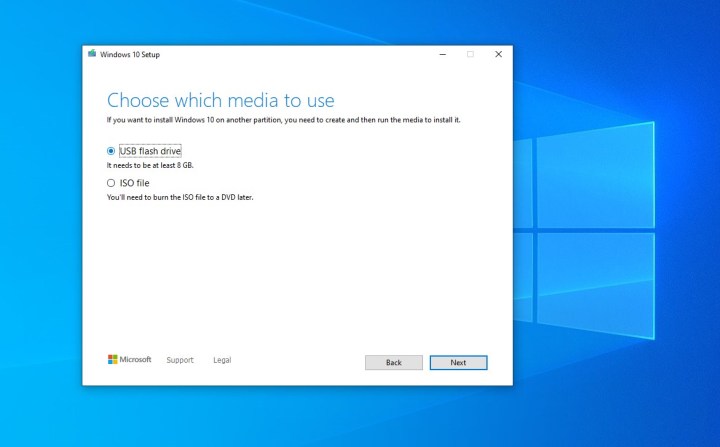
How to install Windows 10 ISO directly
An ISO file with the Windows 10 Setup.Windows 10 Setup – Choose the language, time, currency, and keyboard.Press Install now.Enter the Windows 10 activation key.Choose the Windows 10 edition you want to install.Accept the license terms.Click or tap on Custom: Install Windows only (advanced)
Can I directly install Windows 10
If you want to install Windows 10 directly from the ISO file without using a DVD or flash drive, you can do so by mounting the ISO file. This will perform an upgrade of your current operating system to Windows 10.
How to download Windows 10 ISO without media
How to Download an Official Windows 10 ISO without the Media Creation ToolNavigate to the Windows 10 download site and open the context menu.Open developer tools.Open the Network conditions panel.Untick 'Select automatically'Change your Chrome user agent.Refresh the page.Select your Windows 10 edition.Click “Confirm”
How to install win 10 for free
Drive head to the windows 10 download page and download the tool i've linked the page. Below. Run the program and once you've accepted the license agreement. Choose create installation. Media.
Can I install ISO file directly
iso file directly to your desktop.Locate your ISO file on your computer.Right-click on the ISO file and select Open with > Choose another app.When the window appears select the checkbox by “Always use this app to open /iso files. Then select Windows Explorer from the list.Your ISO file is now mounted to your desktop.
Can you install from an ISO
The alternate method to run the software installation from the iso file is to burn the iso file to a DVD, CD, or USB. Windows have an inbuilt disc burner utility that you could utilize to burn the iso file to a disc. Firstly, insert the DVD, CD, or USB in your PC, then locate it to the iso file folder.
Can I directly install Windows 10 without USB
Another way to install Windows on a new SSD without a USB is to use a Windows ISO file. By using ISO, you do not need a bootable USB drive or Media Creation Tool to install Windows 11 on a computer running Windows 10. You can mount the ISO file in File Explorer and run the upgrade setup.
Is it illegal to install Windows 10 without activation
Installing Windows without a license is not illegal. However, activating the operating system through other means without an officially purchased product key is illegal. If you plan to use Windows 10 at home but don't want to pay, it may be better to use the system without activation.
Can you boot just the ISO file
How to boot virtual machines using ISO file. Open Virtual machine settings and specify the location of the ISO file in Image file text box. Copy the ISO file to the local folder of the virtual machine's server. Under BIOS settings of virtual machine, enable Boot from CD option.
How to install Windows 10 ISO without CD or USB
Download the Windows 10 ISO without using the Media Creation Tool. Right-click the ISO file, select the Open with submenu, and choose the Windows Explorer option. Quick tip: If you don't have a third-party application to manage file compression, such as 7Zip, you can simply double-click the ISO file.
How to install win 10 without USB or cd
Go to Choose an option > Troubleshoot > Reset this PC. And then, start to reinstall windows 10 without key by following the wizard. Microsoft comes with a media creation tool that can upgrade this PC to Windows 10 by creating an installation media or directly using the ISO file to install Windows 10.
How to install Windows 10 for free offline
Step 1: Download and run the Windows 10 Media Creation Tool from the official website of Microsoft. Step 2: Accept license terms (This process may take a long time, please be patient and do not close the window). Step 3: Select the option of creating installation media and go to the next step.
Can I just extract ISO file
Navigate to the ISO's file location in File Explorer. Right-click on the ISO file and select Extract to "[FILENAME]".
How to install an ISO file without mounting it
Burn the ISO File to Disc
Another option is to simply burn the ISO file to a CD or DVD, or copy it to a USB drive and install it from there. This is a useful method if you wish to store the program on a disc that you can install in any version of Windows.
Can I just extract an ISO
Navigate to the ISO's file location in File Explorer. Right-click on the ISO file and select Extract to "[FILENAME]".
Can you turn an ISO into an EXE
In fact, you can use a virtual CD/DVD drive to convert ISO to EXE without burning a DVD. Apps such as DAEMON Tools Lite, MagicDisc, and Virtual CloneDrive are perfect for this job.
Can I install ISO without USB
Another way to install Windows on a new SSD without a USB is to use a Windows ISO file. By using ISO, you do not need a bootable USB drive or Media Creation Tool to install Windows 11 on a computer running Windows 10. You can mount the ISO file in File Explorer and run the upgrade setup.
How to install Windows 10 ISO without USB or DVD
Download the Windows 10 ISO without using the Media Creation Tool. Right-click the ISO file, select the Open with submenu, and choose the Windows Explorer option. Quick tip: If you don't have a third-party application to manage file compression, such as 7Zip, you can simply double-click the ISO file.
What happens if I never activate Windows 10
If you don't activate Windows 10, some features will be disabled upon the expiry of the trial period. For instance, you won't be able to customize your PC or laptop, meaning features like themes, lock screen, colors, fonts, and taskbar will return to their default settings (if you customized them).
What happens if I activate pirated Windows 10
Since pirated copies do not receive updates, malware or viruses are more likely to infect them. And a single strain of malware, like the dreaded ransomware, can erase or lock you out of your files. Besides random attacks, the person you downloaded Windows from could have loaded the pirated copy with malware.
Can I boot an ISO without a USB
You don't need a bootable USB flash drive or Media Creation Tool to install Windows 11 on a computer already running Windows 10. You can simply mount the ISO file to File Explorer and run the upgrade setup.
How to create Windows 10 boot from ISO
Boot Windows 10 using ISOInsert the CD/DVD into the target computer.Open the Boot order menu, and select the CD/DVD drive either from LEGACY BOOT or UEFI BOOT.Ensure that you select the required boot option based on the created image to perform the proper deployment.
Can I just put Windows ISO on USB
Can I convert a Windows 10 ISO to USB Yes, you can! To make a copy of Windows 10 on a USB flash drive, download and launch the Windows Media Creation tool, select Create installation media and follow the prompts.
Can I install Windows 10 ISO without USB
To clean install or reinstall Windows 10, you don't need to prepare a bootable USB of Windows 10. All you need is Windows 10 ISO, which you can get from Microsoft with the help of the official Media Creation Tool.
How to install original Windows 10 without CD
Restore without an installation CD:Go to "Start" > "Settings" > "Update & Security" > "Recovery".Under "Reset this PC option", tap "Get Started".Choose "Remove everything" and then choose to "Remove files and clean the drive".Finally, click "Reset" to begin reinstalling Windows 10.


0 Comments